No-Face Effect in Hypic: Hide Faces Without Blur (2026 Guide)
Quick Answer
Want to hide a face in a photo without using an obvious blur effect?
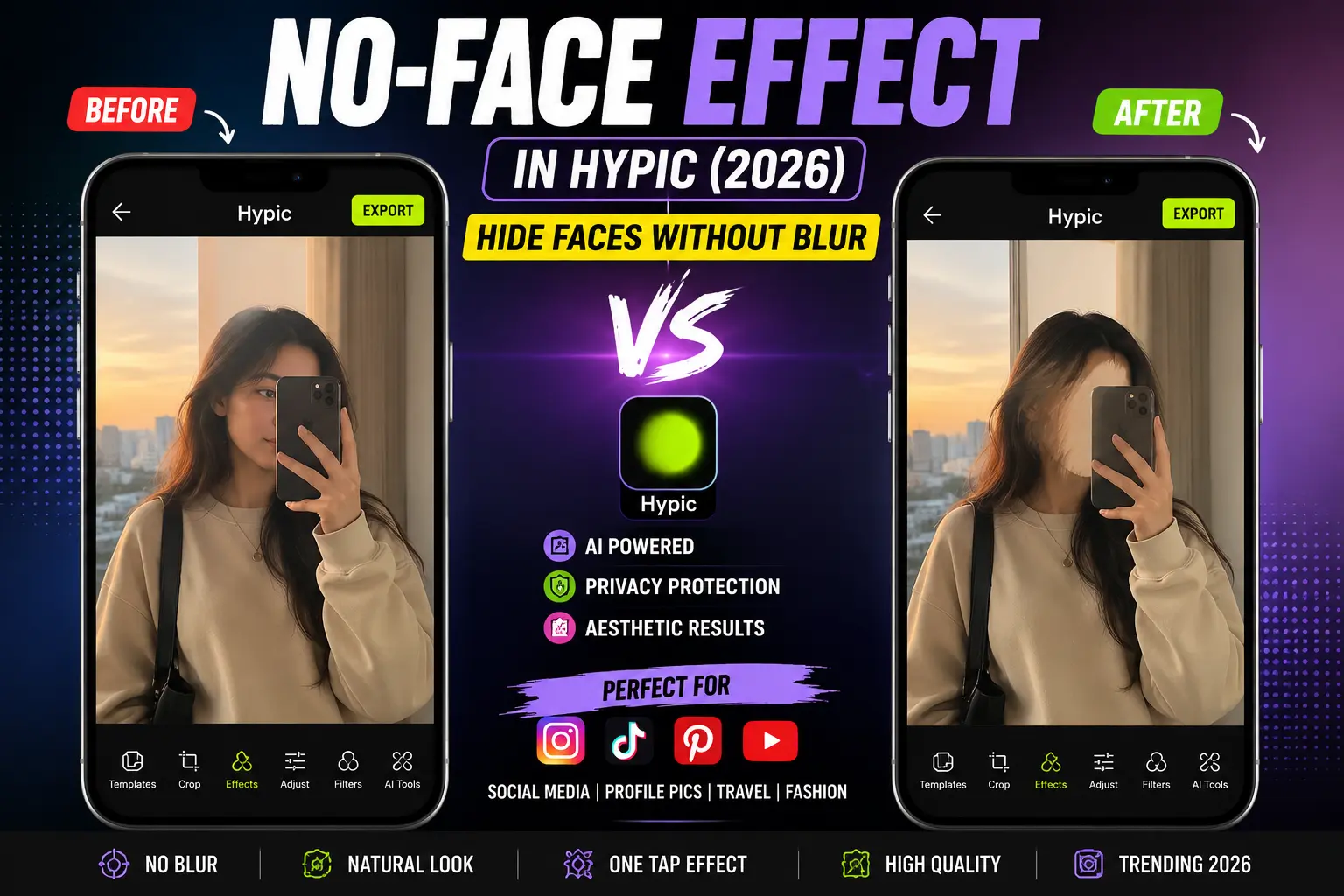
The No-Face Effect in Hypic is an AI-powered editing feature that removes or transforms facial details while preserving the overall look of the image. It’s commonly used for faceless aesthetic photos, anonymous social media posts, fashion content, and privacy-focused photography.
In this guide, you’ll learn how to use the No-Face Effect in Hypic. If you’re new to the app, check out these hidden Hypic features that many users overlook.
What Is the No-Face Effect in Hypic?
The No-Face Effect is an AI editing tool designed to conceal or transform facial features without affecting the rest of the image.
Unlike traditional face blur tools that simply cover a face with a blurry patch, the No-Face Effect aims to create a more natural and artistic result.
Many creators use it to produce:
- Faceless aesthetic photos
- Anonymous social media content
- Fashion photography
- Profile pictures
- Travel content
- Storytelling posts
- Privacy-friendly images
Because the effect blends with the overall photo, the final image often looks more intentional than a standard blur.
Why the No-Face Effect Has Become So Popular
Faceless photography has become a major trend across social media.
Creators often prefer hiding their identity while still sharing high-quality content.
Here are some of the biggest reasons people use the No-Face Effect.
Protect Personal Privacy
Not everyone wants their face visible online.
The effect allows users to share photos while keeping their identity private.
Create Trendy Faceless Aesthetic Photos
Faceless photography continues to perform well on platforms like Instagram, TikTok, and Pinterest because it adds mystery and visual appeal.
Focus Attention on the Environment
When facial details are hidden, viewers naturally pay more attention to:
- Clothing
- Location
- Colors
- Composition
- Mood
Add a Creative and Artistic Look
Many creators use the effect purely for artistic reasons rather than privacy.
The result often feels more cinematic and unique.
How to Hide Faces in Photos Using Hypic
Follow these simple steps to create a faceless photo using the No-Face Effect.
Step 1: Open Hypic
Launch the Hypic app and select the image you want to edit.
For best results, use a clear, high-resolution photo.
Step 2: Open the Effects Section
Navigate to the Effects menu within the editor.
This is where most AI-powered editing features are located.
Step 3: Search for the No-Face Effect
Use the search bar and type:
- No Face
- No-Face Effect
- Face Hide Effect
Depending on your app version, the feature may appear under AI Effects.
If you’re using an older release, you can browse our collection of Hypic old versions to check feature availability.
Step 4: Apply the Effect
Select the effect and allow Hypic to process the image.
The AI will analyze the face and modify facial details while preserving the rest of the scene.
Step 5: Fine-Tune the Result
If customization options are available, adjust:
- Effect intensity
- Face visibility
- Background preservation
- Image quality
Small adjustments can significantly improve the final result.
Step 6: Export Your Image
Save the edited image using the highest available resolution to preserve quality.
Before vs After Using the No-Face Effect
The biggest advantage of the No-Face Effect is that it provides privacy without making the edit look obvious.
| Before | After |
|---|---|
| Face Fully Visible | Face Hidden or Transformed |
| Standard Portrait | Artistic Portrait |
| Identity Exposed | Privacy Protected |
| Basic Social Photo | Aesthetic Social Content |
| Traditional Appearance | Modern Creative Look |
This is one reason why many creators prefer it over simple blur effects.
Face Blur vs No-Face Effect
Many users wonder whether they should use a traditional face blur or the No-Face Effect.
| Feature | Face Blur | No-Face Effect |
|---|---|---|
| Privacy Protection | Good | Excellent |
| Aesthetic Quality | Basic | Modern |
| Social Media Appeal | Average | High |
| Artistic Appearance | Limited | Strong |
| Engagement Potential | Medium | High |
For creators focused on visual quality, the No-Face Effect is often the more attractive option.
Best Photo Types for the No-Face Effect
While the feature can work on many images, it tends to perform best on:
- Street photography
- Travel photos
- Fashion portraits
- Mirror selfies
- Couple photos
- Lifestyle photography
- Pinterest content
- Instagram reels thumbnails
Travel photos can look even better when combined with creative Hypic prompts for AI-generated backgrounds
Photos with good lighting and clear facial visibility usually produce the most consistent results.
Who Should Use the No-Face Effect?
This feature is especially useful for:
Instagram Creators
Create aesthetic content without revealing your identity.
TikTok Creators
Build a recognizable visual style while maintaining privacy.
Pinterest Users
Faceless photography performs particularly well in aesthetic niches.
Fashion Influencers
Keep the focus on clothing, accessories, and styling.
Privacy-Conscious Users
Share memories online without exposing personal information.
Tips for Better Faceless Aesthetic Photos
Want your edits to look more professional?
Try these techniques.
Use Natural Lighting
Well-lit images help AI tools generate cleaner and more realistic results.
Keep the Background Interesting
When the face is hidden, viewers focus more on the surrounding environment.
Interesting backgrounds can make the image more engaging.
Add Color Grading
After applying the No-Face Effect, experiment with:
- Cinematic filters
- Vintage tones
- Warm color grading
- Moody aesthetics
This often enhances the overall visual impact.
Experiment with Different Angles
Some of the best faceless photos use:
- Side profiles
- Back-facing poses
- Wide-angle shots
- Walking photos
These compositions naturally complement faceless photography.
Common Problems and Solutions
The Effect Looks Unnatural
Use a higher-quality image and ensure the face is clearly visible before applying the effect.
Facial Features Are Still Visible
Increase the effect intensity if your version of Hypic supports adjustment controls.
Photo Quality Drops After Editing
Export the image at maximum quality and avoid repeatedly re-editing the same file.
Related Hypic Features Worth Trying
If you enjoy using the No-Face Effect, you may also like:
- AI Flash for low-light photos
- AI Expand for background generation
- AI Replace for object replacement
- Portrait Enhancement tools
- AI Hair enhancement features
Combining multiple AI tools often produces the best overall results.
If you’re comparing editing tools, you may also want to explore our detailed Hypic comparisons to see how Hypic performs against other AI photo editors
Frequently Asked Questions
Can I hide a face in Hypic without blurring it?
Yes. The No-Face Effect is designed to conceal or transform facial details without relying on traditional blur effects.
Is the No-Face Effect free in Hypic?
Availability depends on your app version, region, and subscription plan. Some AI features may require premium access.
Does the No-Face Effect work on group photos?
Yes, although results can vary depending on image quality and the number of faces present.
Is faceless photography still popular in 2026?
Yes. Faceless content remains popular across Instagram, TikTok, and Pinterest because it combines privacy with creativity.
What type of photos work best with the No-Face Effect?
Portraits, mirror selfies, travel photos, fashion photography, and lifestyle content generally produce the best results.
Can I create faceless aesthetic photos without editing skills?
Yes. The effect is designed to be beginner-friendly and usually requires only a few taps.
Final Thoughts
The No-Face Effect in Hypic offers a modern alternative to traditional face blur tools.
Instead of covering a face with a basic blur, it helps create stylish and visually appealing faceless photos that feel intentional and creative.
Whether you’re protecting your privacy, following social media trends, or experimenting with aesthetic photography, this feature is one of the easiest ways to transform ordinary photos into engaging content.
If you’re exploring more advanced Hypic tools, consider trying AI Flash, AI Expand, AI Replace, and Portrait Enhancement features to take your edits even further.